

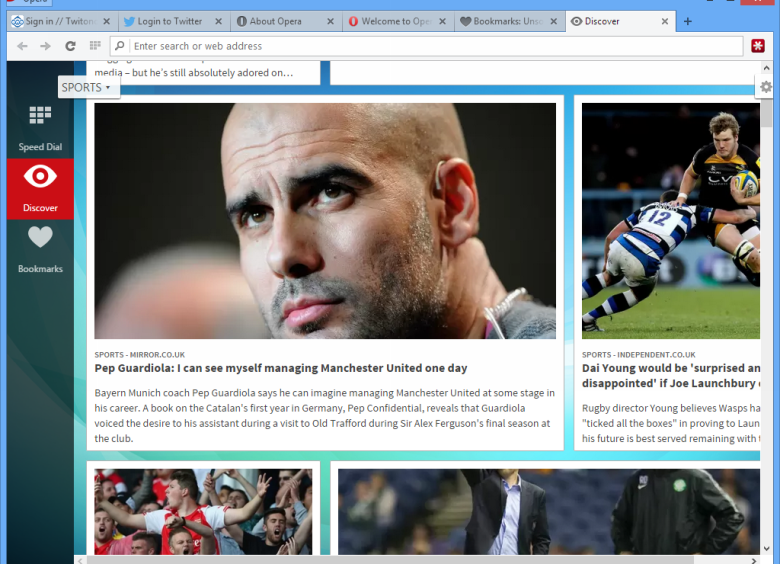
It may not enjoy the same level of attention as other heavyweight web browsers, but there’s still a lot to like about Opera. Rebooted in June 2013 as a Chromium-based variant, the new Opera’s early history was a troubled one, with many long-established features absent. Even now, some aren’t coming back – specifically Opera’s old built-in mail client, which is available on its own as Opera Mail.
The reboot was prompted by Opera’s decision to abandon its own proprietary web rendering engine (Presto) in favour of Google’s open-source Chromium engine. This left Opera room to focus more on the user interface, and while it’s taken a while to get all the key functionality back, Opera is now starting to fire on all cylinders, particularly now bookmark support has been restored after various failed attempts to move to a different way of storing favourites.
The redesigned Start page gives you a choice of three views: Speed Dial lets you place key favourites front and centre via a series of tiles, which includes the ability to group related sites together. The Discover tab can be customised to show you news and updates from a variety of topics focused on your chosen location.
And finally, the restored bookmarks can be displayed as a list or as a grid containing thumbnail preview images (or site icon). What was stored in the now-defunct Stash can be found here. It’s very flashy, but the key thing is it’s logical, and it works.
Other handy features include Opera Turbo – technology also found on its mobile browser that compresses data while you browse to speed up website loading. It’s designed primarily for slower networks but will work on any network you choose. Also look out for Tab Previews (simply roll your mouse over any tab for a pop-up preview of its contents, which are dynamically updated along with the page itself).
Opera is still a work in progress, but it’s come a long way in the 15 months since we reviewed the first release of this new reboot. It’s now starting to feel like a genuine alternative to the better-known browsers out there.
Verdict:
It’s taken a while, but Opera’s rebooted web browser is finally starting to come of age, particularly now it’s restored key features like bookmarks. Well worth trying alongside your regular browser.
(17)
Internet Tools
Specifications
Requirements
Windows 7 or higher
Changelog
What’s new in Opera 128.0 (compared to the previous 126)?
CHR-9754 Update Chromium on desktop-stable-126-5168 to 126.0.6422.142
DNA-117089 [Win/Lin] Fullscreen view has rounded corners
DNA-117208 The red dot on the Aria’s icon is misaligned
DNA-117693 X (twitter) logo is not available on opera:about page
DNA-117737 [Bookmarks] Bookmarks bar favicon have light theme color in new window
DNA-117769 Extension popup – pin icon is replaced
DNA-117850 Fix full package installer link
DNA-117852 Promote 112 to stable
DNA-117491 Site info popup is cut with dropdown opened
DNA-117661 [opera:settings] IPFS/IPNS Gateway box has the wrong design
DNA-117789 Translations for O112
DNA-117813 [React emoji picker] Flag emojis are not load correctly
DNA-117893 Put ‘Show emojis in tab tooltip’ in Settings
DNA-117918 Translations for ‘Show emojis in tab tooltip’





Leave a Reply